
Payouts and Rake
Manual and automatic payout schedules, how fixed and percentage places interact, the auto-payout dials, taking a rake, and fixing the sheet mid-tournament.
The rule underneath everything here: the prize pool is the pot minus the rake, and payouts are always calculated against the prize pool, never the gross pot.
If the buy-in and the added prize are both $0, the whole Payouts section disappears and is replaced with a note saying there is nothing to pay out. A free game needs no payout sheet.
Rake
Premium only. A rake is a cut taken off the top, before anybody gets paid.
| Option | What it does |
|---|---|
| None | The default. No cut. |
| Per Player | A set amount per entry. Ten entries at $5 is a $50 rake. |
| Flat | One fixed amount, regardless of how many play. |
| % | A percentage of the pot. |
Whatever you choose, the rake can never exceed the pot. A percentage rake above 100 is rejected outright when you try to start, not silently reduced.
The setup screen shows you the arithmetic as you go:
Prize pool: $450 (10 entries × $50 − $50 rake)
And once the tournament is live, the pot tile on the live screen relabels itself from Total Pot to Prize Pool, so nobody is looking at a number that includes your cut.
If your Premium license lapses, the rake is cleared from any tournament that has not started. A running tournament keeps its rake.
Payout Mode: Manual or Auto
Manual is available to both Paid and Premium tiers. Auto is Premium only.
Manual payouts
You define each paid place yourself, as a row.
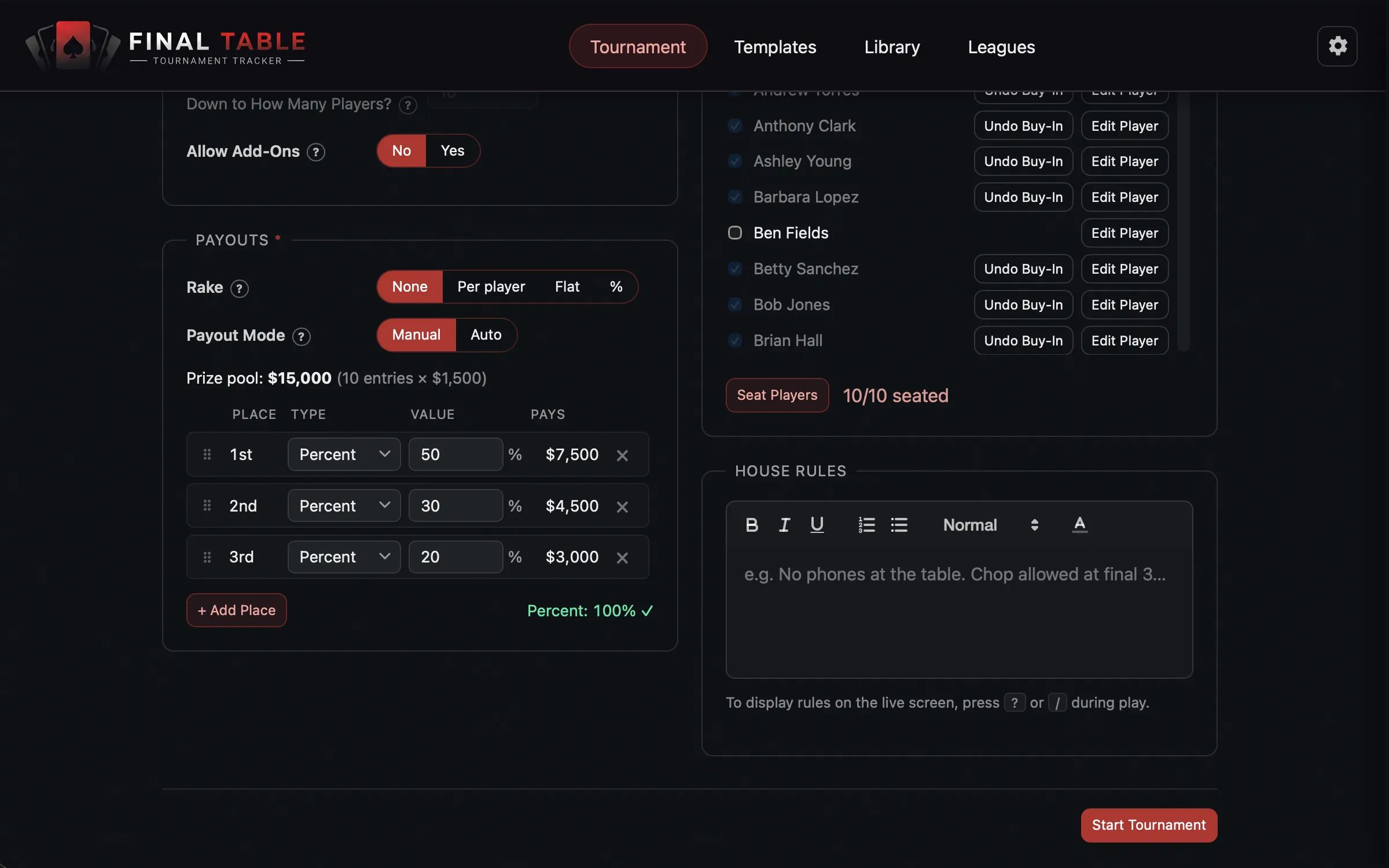 Manual payouts. Drag to reorder; the footer tells you whether it adds up.
Each row has a Type, either Percent or Fixed $, and a Value. Drag the rows by the handle to reorder them; the places renumber themselves.
The one thing to understand is how the two types interact:
Fixed amounts come off the top. The percent places then split whatever is left.
So if you have a $1,000 pool, a fixed $100 for 4th place, and percent places for 1st through 3rd, then 1st through 3rd are splitting $900, not $1,000.
The practical consequence: as more people buy in during late registration, percent places grow and fixed places do not. That is usually what you want. A fixed “your money back” min-cash for the bubble stays put while the top of the sheet swells.
Your percentages must total exactly 100%. The footer keeps a running tally and shows a tick when it balances. The app will not let you start otherwise. It also will not let you set fixed payouts that eat the entire pot when you still have percent places to pay, because those places would get nothing.
Auto payouts
Premium only. You describe the shape of the payout sheet and the app computes it, then keeps recomputing it as the field grows.
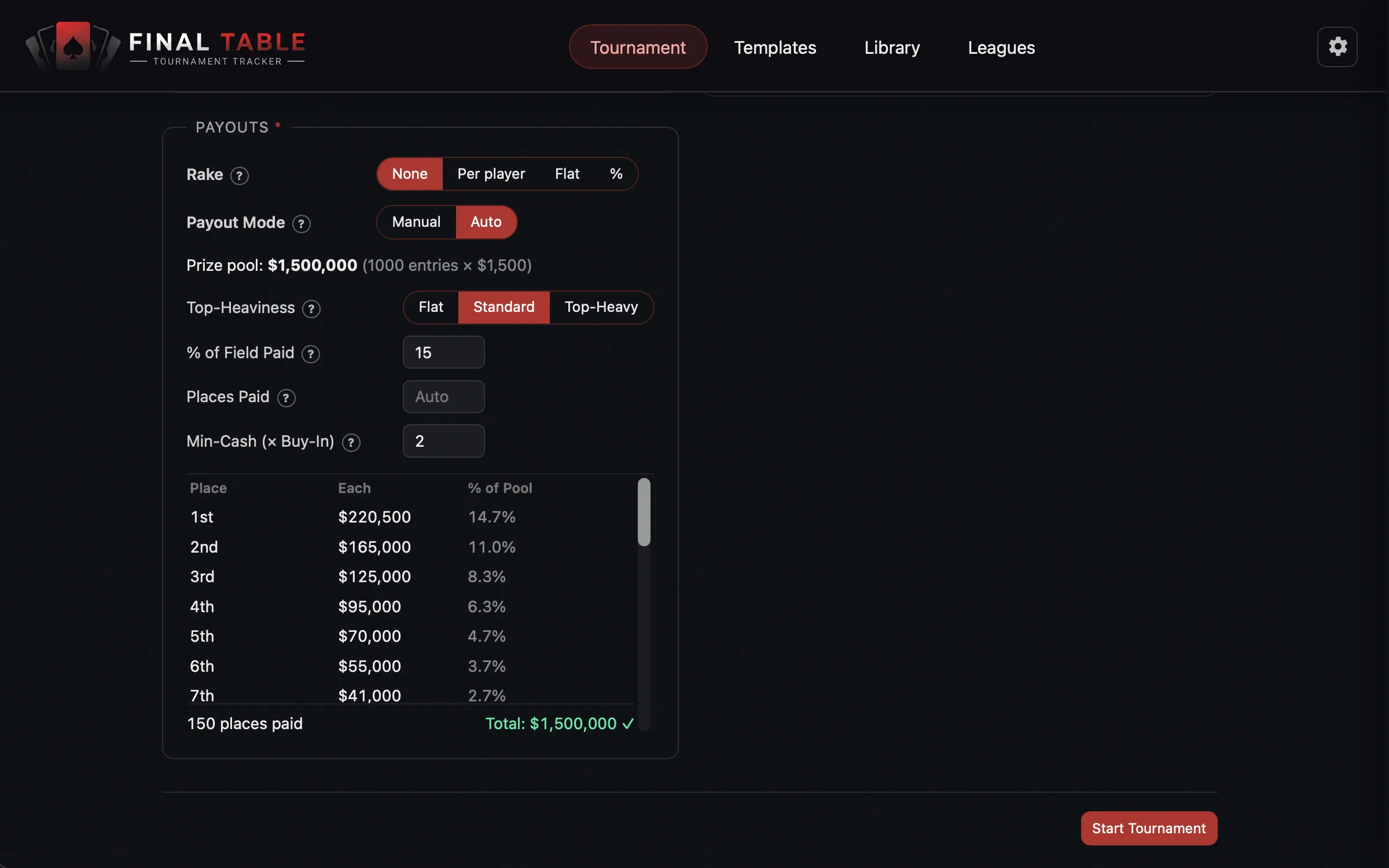 Auto payouts: four dials and a live preview.
| Dial | What it does | Default |
|---|---|---|
| Top-Heaviness | How concentrated the prizes are. Flat spreads the money out; Top-Heavy loads the winner; Standard is in between. | Standard |
| % of Field Paid | Roughly what fraction of the field cashes. The WSOP pays about 15%. | 15 |
| Places Paid | Pay exactly this many places, overriding the percentage. Leave it blank to let the percentage decide. | Blank (auto) |
| Min-Cash (× Buy-In) | The smallest payout, as a multiple of the buy-in. A 2 means last place paid gets at least double their money back. | 2 |
The preview table shows you exactly what it will pay: each place (or range of places), the dollar amount, and its share of the pool.
How to think about the dials: % of Field Paid decides how many places, and
Min-Cash is a floor that can veto it. If paying 15% of a small field would mean paying
someone $3 out of a $30 buy-in, the app trims places until the money it does pay clears the
min-cash floor. If the pool cannot fund even one min-cash payout, it becomes winner-take-all.
Two behaviors worth knowing so the sheet does not surprise you:
- The top 9 places always get their own distinct prize. Below that, deep places are grouped into equal-paying brackets, which is how real tournaments do it (places 10 through 12 all pay the same).
- Amounts are rounded to sensible money, scaled to your buy-in, and the leftover cents are rolled into first place so the sheet sums to the pool exactly. Nobody is handing out $27.34.
Changing payouts mid-tournament
Late registration means you often do not know the real prize pool until the window shuts. So the app waits.
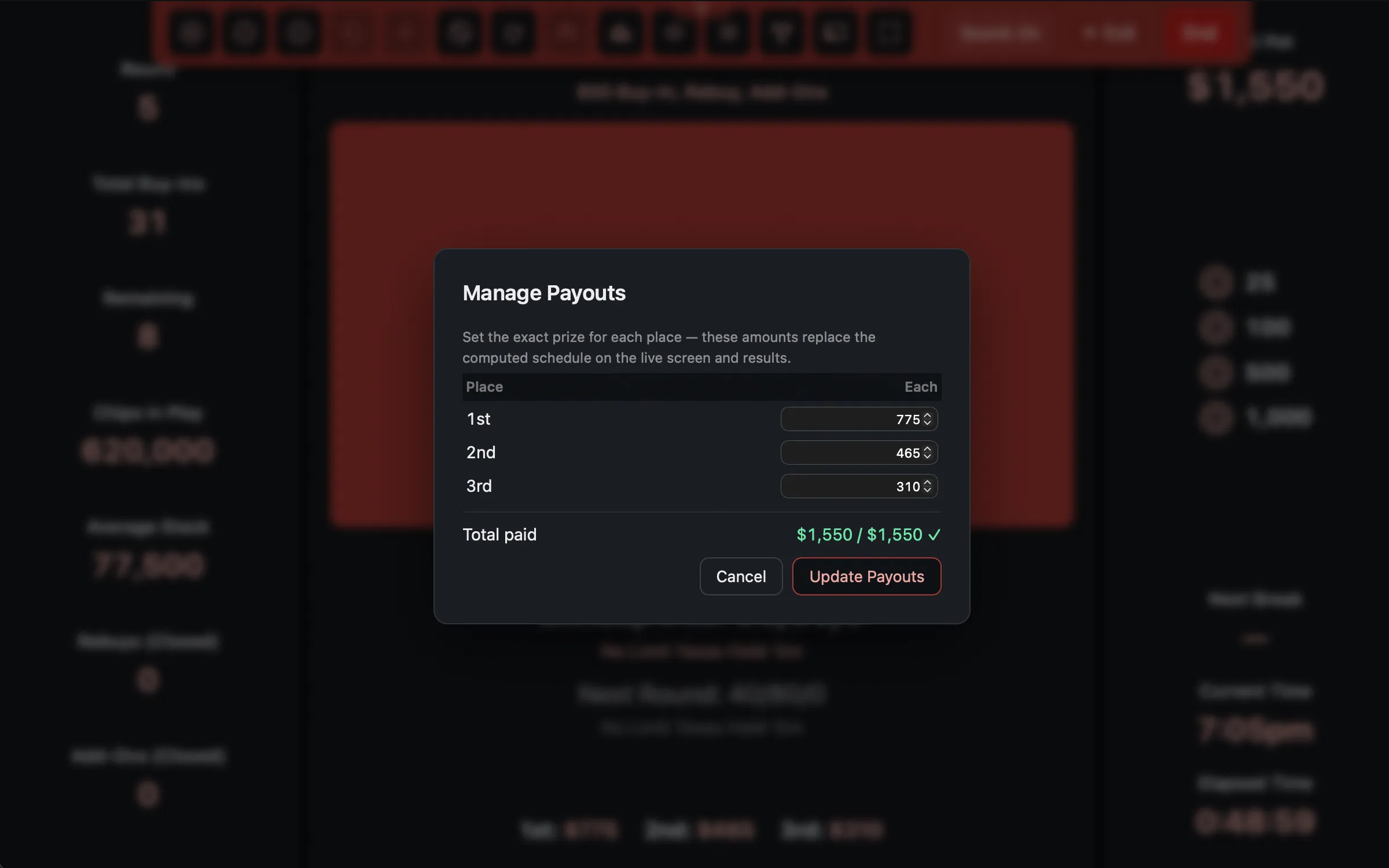 Manage Payouts, once registration has closed.
Once the registration window closes, the Manage Payouts action unlocks on the live
screen (toolbar, or press p). It shows the computed sheet with the final pool, and lets
you type the exact dollar amount for each place.
This is the escape hatch for real life: the pool came to $1,247 and you want to pay round numbers.
- You can only edit the amounts. The place brackets stay as the sheet worked them out.
- The total does not have to match the prize pool. If it does not, the app says so (“Total doesn’t match the prize pool - that’s allowed, but double-check it’s intentional”) and lets you save anyway. It assumes you know what you are doing, but it will not let you do it by accident.
- Reset to Computed puts it back.
Whatever you set here replaces the computed schedule everywhere: the live screen, the final standings, and the results history.